
LPG Mobile Number Update is one of the most searched gas service requests in India. Your registered mobile number is required for LPG cylinder booking, subsidy notifications, OTP verification, delivery updates, and customer support services. If you have changed your phone number or lost access to your old mobile number, updating it with your LPG provider becomes important.
Whether you use Indane Gas, Bharat Gas, or HP Gas, the LPG Mobile Number Update process is simple and can be completed online or through your distributor.
Read also: LPG Consumer ID Search by Mobile Number
Why Is LPG Mobile Number Update Important?
Your registered mobile number is linked to various LPG services, including:
- LPG cylinder booking
- Subsidy notifications
- OTP verification
- Delivery status updates
- Consumer account access
- Complaint registration
- eKYC verification
If your mobile number is outdated, you may face problems while booking a gas cylinder or receiving important service alerts.
How to Update LPG Mobile Number Online
Most LPG companies now provide online facilities to update customer details.
Step 1: Visit Your LPG Provider Portal
Visit the official customer portal of your LPG distributor.
Step 2: Login to Your Account
Use your Consumer Number, LPG ID, or registered credentials.
Step 3: Open Profile Settings
Navigate to customer profile or account details.
Step 4: Enter New Mobile Number
Provide your new mobile number and verify it through OTP.
Step 5: Save Changes
After successful OTP verification, your new number will be linked to your LPG account.
The update may reflect immediately or within 24 to 48 hours.
LPG Mobile Number Update for Indane Gas
Indane customers can update their registered mobile number through the online portal, distributor office, or customer care support.
You may need:
- Consumer Number
- Aadhaar-linked mobile number
- Identity proof (if requested)
Read also: Indane Gas Consumer Number Search
LPG Mobile Number Update for Bharat Gas
Bharat Gas consumers can update their mobile number through:
- Online customer portal
- Bharat Gas distributor
- Customer support services
After verification, all future booking alerts and delivery messages will be sent to the updated number.
LPG Mobile Number Update for HP Gas
HP Gas customers can update mobile details using:
- HP Gas portal
- HP Pay application
- Local distributor office
OTP verification is generally required before changes are approved.
Documents Required for LPG Mobile Number Update
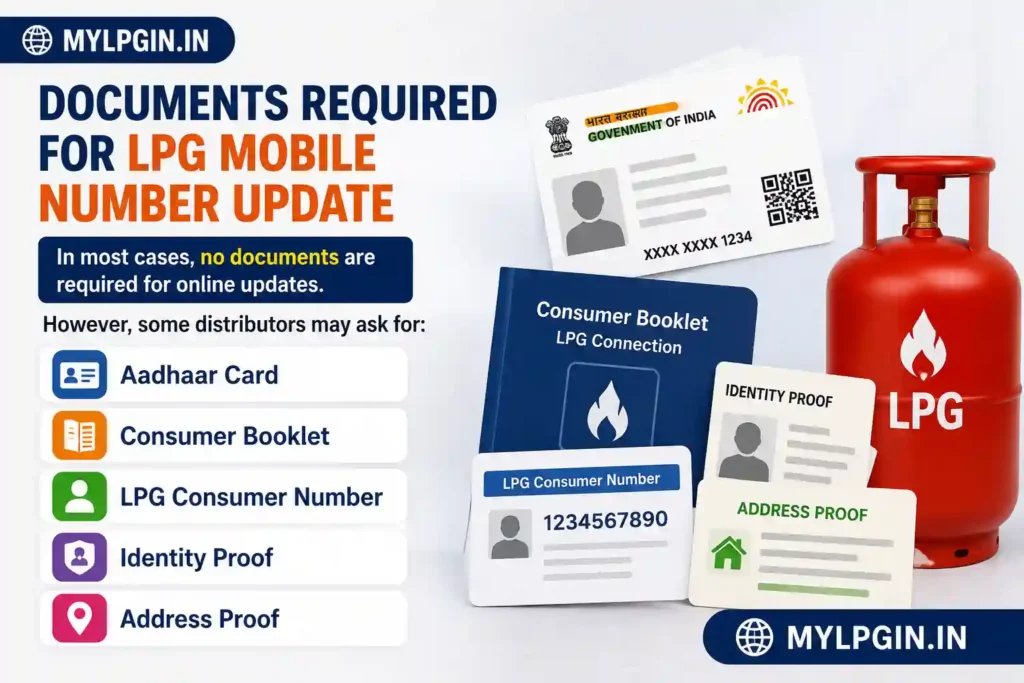
In most cases, no documents are required for online updates.
However, some distributors may ask for:
- Aadhaar Card
- Consumer Booklet
- LPG Consumer Number
- Identity Proof
- Address Proof
Offline LPG Mobile Number Update Process
If online services are unavailable, follow these steps:
- Visit your LPG distributor office.
- Carry your consumer number.
- Submit a mobile number update request.
- Provide identity verification if required.
- Complete OTP verification.
- Receive confirmation from the distributor.
The process is usually completed within a few working days.
Read also: Find My LPG ID Online
Common Problems During LPG Mobile Number Update
OTP Not Received
Network issues or outdated account information can prevent OTP delivery.
Consumer Number Not Found
Verify your LPG Consumer Number before submitting the request.
Mobile Number Already Registered
Sometimes a mobile number may already be linked to another LPG account and requires manual verification.
Update Not Reflecting
Wait for 24–48 hours and contact customer support if the issue continues.
Benefits of Updating Your LPG Mobile Number
Updating your LPG mobile number provides several advantages:
- Faster LPG booking
- Instant subsidy notifications
- Delivery tracking alerts
- Secure account access
- Easy OTP verification
- Better customer support experience
Keeping your mobile number updated ensures uninterrupted LPG services and reduces account-related issues.
Can I Change My LPG Registered Mobile Number Without Aadhaar?
Yes. In many cases, LPG companies allow mobile number updates through OTP verification and consumer account authentication. However, specific requirements may vary depending on the distributor.
How Long Does LPG Mobile Number Update Take?
Most online updates are completed instantly after OTP verification. Offline requests submitted through distributors may take 1–3 working days.
Conclusion
The LPG Mobile Number Update process is simple and essential for every LPG consumer. A correct registered mobile number helps you receive booking confirmations, subsidy alerts, OTPs, and delivery notifications without interruption. Whether you use Indane, Bharat Gas, or HP Gas, updating your mobile number ensures smooth access to all LPG services.
FAQs
You can log in to your LPG provider account, verify your identity through OTP, and submit your new mobile number.
Not always. Many updates can be completed through OTP verification and consumer account authentication.
Online updates are usually instant, while offline requests may take up to a few working days.
Yes, you can visit your LPG distributor and submit a mobile number update request.
Your registered mobile number may be outdated, incorrectly entered, or facing network issues.